
Cool Text Generator Online: How to Make Your Text Stand Out
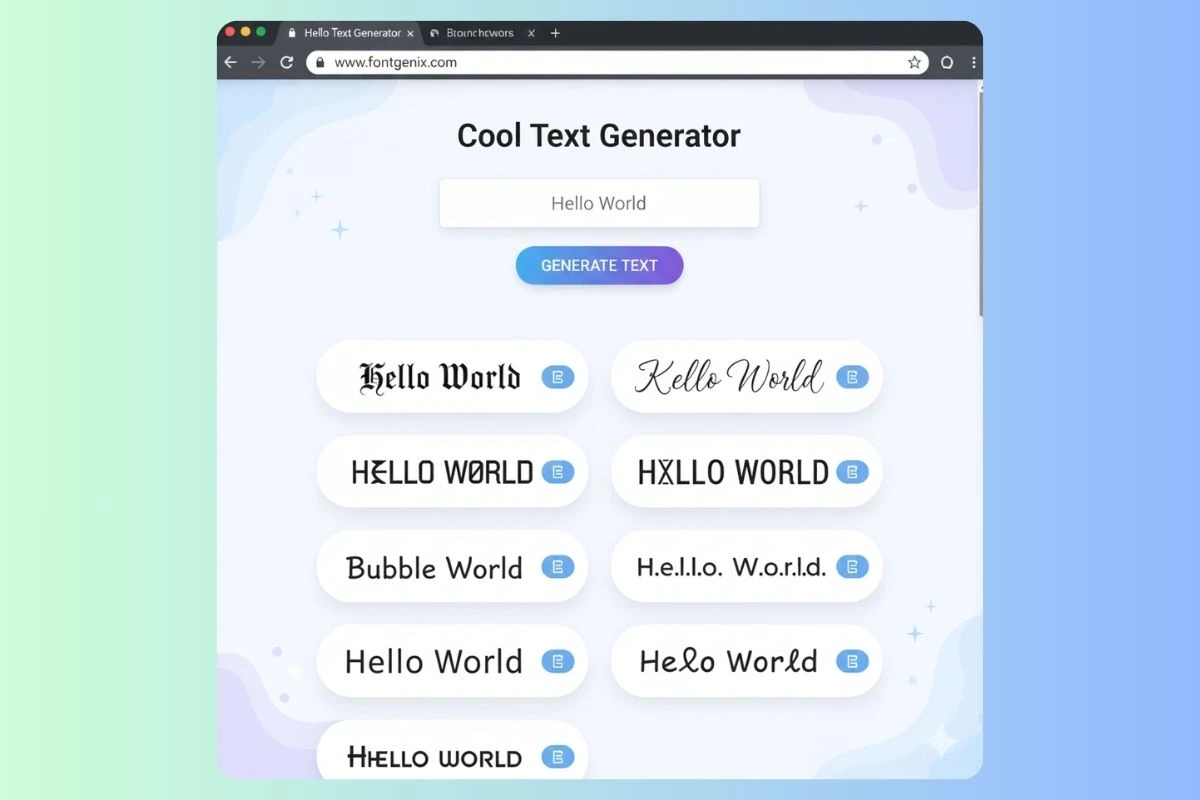
A cool text generator online is a powerful, user-friendly web tool that transforms your ordinary text into unique, eye-catching fonts that stand out in today's digital landscape. Whether you're creating content for social media, designing gaming usernames, crafting memorable bios, or simply wanting to add personality to your digital communications, a cool text generator provides an instant solution that requires no design skills, software downloads, or technical knowledge.
These innovative tools use Unicode symbols - a universal character encoding standard - to convert plain text into stylized versions that look completely different from standard fonts. The transformation happens instantly: you type or paste your message, browse through dozens or even hundreds of font style options, and with a single click, you can copy the coolest version to use anywhere you want.
For example, a simple phrase like "Hello World" can be transformed into dramatically different cool text styles such as: ᕼᗴᒪᒪO ᗯOᖇᒪD (bold block style), h€llø wørld (stylish alternative), 𝐇𝐞𝐥𝐥𝐨 𝐖𝐨𝐫𝐥𝐝 (bold mathematical), or 𝓗𝓮𝓵𝓵𝓸 𝓦𝓸𝓻𝓵𝓭 (elegant script). Each style conveys a different mood and aesthetic, allowing you to find the perfect match for your specific needs.
What Makes a Text Generator "Cool"?
Not all text generators are created equal. A truly cool text generator offers several key features that set it apart:
Extensive Font Library
The best cool text generators offer 100+ font styles, giving you endless creative possibilities. These typically include:
- Bold and Heavy Fonts: 𝐁𝐨𝐥𝐝, 𝗕𝗼𝗹𝗱 - Perfect for making statements
- Italic and Slanted: 𝐼𝑡𝑎𝑙𝑖𝑐, 𝐼𝑡𝑎𝑙𝑖𝑐 - Great for emphasis
- Cursive and Script: 𝒞𝓊𝓇𝓈𝒾𝓋𝑒, 𝓢𝓬𝓻𝓲𝓹𝓽 - Elegant and sophisticated
- Gothic and Medieval: 𝔊𝔬𝔱𝔥𝔦𝔠, 𝕲𝖔𝖙𝖍𝖎𝖈 - Dark and dramatic
- Monospace and Technical: Mono, M O N O - Modern and tech-focused
- Decorative and Ornate: 【Decorative】, 『Ornate』 - Unique and eye-catching
- Bubble and Rounded: ⓑⓤⓑⓑⓛⓔ, 🅑🅤🅑🅑🅛🅔 - Fun and playful
- Special Characters: §p€c!@l, S̶p̶e̶c̶i̶a̶l̶ - Edgy and unique
Real-Time Preview
Cool text generators show you all font variations instantly as you type. This real-time preview feature is crucial because it allows you to:
- Compare multiple styles side-by-side
- See exactly how your text will look before copying
- Experiment with different options quickly
- Make informed decisions about which style works best
One-Click Copy Functionality
The best generators include copy buttons next to each font style, making it incredibly easy to copy your chosen text. This eliminates the frustration of manually selecting and copying, especially on mobile devices where text selection can be tricky.
Mobile-Friendly Design
Since many users create cool text on their smartphones, top generators are fully optimized for mobile devices. This means:
- Responsive design that works on all screen sizes
- Touch-friendly interface
- Easy copy functionality on mobile
- Fast loading times even on slower connections
How Cool Text Generators Work
Understanding how cool text generators work helps you use them more effectively:
The Unicode System
Cool text generators leverage the Unicode standard, which includes over 140,000 characters from various writing systems, symbol sets, and special character collections. When you type regular text like "A", the generator maps it to Unicode equivalents that look stylized, such as:
- Regular: A
- Bold: 𝐀
- Italic: 𝐴
- Script: 𝒜
- Double-struck: 𝔸
- Full-width: A
- Mathematical: 𝐴
Character Mapping
Each font style has its own character mapping table. When you input text, the generator:
- Reads each character in your input
- Looks up the corresponding Unicode character in the mapping table
- Replaces the original character with the styled version
- Displays the transformed text instantly
Platform Compatibility
Because cool text uses standard Unicode characters, it works across most modern platforms and devices. However, compatibility can vary:
- Excellent Support: Instagram, TikTok, WhatsApp, Discord, most gaming platforms
- Good Support: Twitter/X, Facebook, LinkedIn (with some limitations)
- Limited Support: Some older devices, certain email clients, some messaging apps
Popular Use Cases for Cool Text Generators
Cool text generators have countless applications across different platforms and purposes:
Social Media Bios and Profiles
Transform your social media presence with cool text:
- Instagram Bios: Make your bio name stand out with elegant or bold fonts
- Twitter Handles: Create unique display names (though usernames can't use fancy text)
- TikTok Profiles: Stand out in the discover feed with stylish bio text
- Facebook Pages: Add personality to your page name or description
Example: A gaming content creator might transform "Pro Gamer" into 【Pro Gamer】 or 𝐏𝐫𝐨 𝐆𝐚𝐦𝐞𝐫
Gaming Usernames and Tags
Gaming platforms are perfect for cool text:
- Steam Usernames: Create memorable gaming identities
- Xbox Gamertags: Stand out in multiplayer lobbies
- PlayStation IDs: Make your profile unique
- Discord Names: Personalize your server presence
- Twitch Channel Names: Build a recognizable brand
Example: "ShadowBlade" becomes Ŝђα∂σωβℓα∂є or 𝕾𝖍𝖆𝖉𝖔𝖜𝕭𝖑𝖆𝖉𝖊
Messaging and Communication
Add flair to your messages:
- WhatsApp: Cool group names, status updates, message emphasis
- Telegram: Channel names, group titles, personal messages
- Discord: Server names, channel names, role names, nicknames
- Slack: Channel names, status messages (with platform limitations)
Content Creation
Enhance your content with cool text:
- YouTube: Channel names, video titles (in descriptions), thumbnails
- Blog Headers: Create eye-catching blog post titles
- Email Subject Lines: Stand out in crowded inboxes (test first)
- Presentation Slides: Add visual interest to titles and headers
Branding and Marketing
Businesses use cool text for:
- Social Media Branding: Consistent font style across platforms
- Marketing Campaigns: Eye-catching campaign names and slogans
- Product Names: Unique product or service names
- Event Promotion: Memorable event names and announcements
Step-by-Step: Using a Cool Text Generator
Here's a detailed guide to getting the most out of cool text generators:
Step 1: Access the Generator
Visit a reliable cool text generator like FontGenix. Look for generators that are:
- Free to use (no hidden costs)
- No registration required
- Mobile-friendly
- Regularly updated with new fonts
Step 2: Enter Your Text
Type or paste the text you want to transform into the input field. Consider:
- Length: Shorter text (under 50 characters) works best
- Content: Names, usernames, short phrases, or key words
- Purpose: What platform will you use this on?
Step 3: Browse Font Styles
As you type, the generator displays multiple font variations. Take time to:
- Scroll through all available options
- Compare how different styles look
- Consider which style matches your purpose
- Think about readability on your target platform
Step 4: Select Your Favorite
Choose the font style that best fits your needs. Consider:
- Does it match your brand or personality?
- Is it readable on mobile devices?
- Will it stand out appropriately?
- Does it convey the right mood or emotion?
Step 5: Copy and Test
Click the copy button (or manually select and copy). Before using it:
- Paste it into a test document or note app
- Check that all characters copied correctly
- Preview how it looks on your target platform
- Test on mobile if that's where it will be viewed
Step 6: Use Your Cool Text
Paste your cool text wherever you want to use it. Popular destinations include:
- Social media bios and profiles
- Gaming platform usernames
- Messaging app group names
- Content creation platforms
- Anywhere you want to stand out!
Best Practices for Using Cool Text
To maximize the impact of cool text, follow these best practices:
Maintain Readability
Readability should always be your top priority. Even the coolest font is useless if people can't read it. Guidelines:
- Avoid overly complex fonts for important information
- Test on mobile devices where most users will see it
- Keep text length reasonable (shorter is better)
- Choose simpler fonts for longer text blocks
Match Your Brand or Personality
Your cool text should align with your brand identity or personal style:
- Elegant brands: Script or cursive fonts
- Bold brands: Heavy, impactful fonts
- Modern brands: Minimalist, clean fonts
- Creative brands: Decorative, unique fonts
- Tech brands: Monospace or technical fonts
Use Strategically
Cool text is most effective when used strategically:
- Use for key elements (names, titles, important phrases)
- Don't overuse - less is often more
- Mix cool text with regular text for balance
- Reserve the fanciest fonts for the most important elements
Consider Platform Limitations
Different platforms have different capabilities:
- Instagram: Excellent support for most cool text styles
- WhatsApp: Good support, but test group names with all members
- Gaming Platforms: Check platform-specific rules about special characters
- Email: Limited support - test thoroughly before using
- Professional Platforms: Use sparingly and keep it professional
Real-World Examples and Transformations
Let's see how cool text generators transform real-world examples:
Example 1: Social Media Influencer
Original: "Fitness Coach | Transform Your Body"
Cool Text Options:
- Bold: "𝐅𝐢𝐭𝐧𝐞𝐬𝐬 𝐂𝐨𝐚𝐜𝐡 | Transform Your Body"
- Script: "𝓕𝓲𝓽𝓷𝓮𝓼𝓼 𝓒𝓸𝓪𝓬𝓱 | Transform Your Body"
- Boxed: "【Fitness Coach】| Transform Your Body"
Best Choice: Bold font for a fitness coach - conveys strength and confidence
Example 2: Gaming Username
Original: "NightHunter"
Cool Text Options:
- Gothic: "𝔑𝔦𝔤𝔥𝔱𝔥𝔲𝔫𝔱𝔢𝔯"
- Bold: "𝐍𝐢𝐠𝐡𝐭𝐇𝐮𝐧𝐭𝐞𝐫"
- Special: "ŇïghŤhųñŤëŕ"
Best Choice: Gothic font for a gaming username - matches the dark, edgy theme
Example 3: Business Brand
Original: "Sunset Cafe"
Cool Text Options:
- Script: "𝓢𝓾𝓷𝓼𝓮𝓽 𝓒𝓪𝓯𝓮"
- Elegant: "𝒮𝓊𝓃𝓈𝑒𝓉 𝒞𝒶𝒻𝑒"
- Minimalist: "S U N S E T C A F E"
Best Choice: Script font for a cafe - warm, inviting, and sophisticated
Troubleshooting Common Issues
Sometimes cool text doesn't work as expected. Here's how to solve common problems:
Issue: Text Doesn't Display Correctly
Possible Causes:
- Platform doesn't support those Unicode characters
- Device doesn't have the necessary font support
- Browser compatibility issues
- Copy/paste error (partial text copied)
Solutions:
- Try a simpler font style with more common Unicode characters
- Test on the actual platform where you'll use it
- Update your browser or try a different one
- Ensure you copied the complete text
Issue: Text Looks Different on Different Devices
This is normal! Different devices and platforms may render Unicode characters slightly differently. To minimize this:
- Use more common Unicode character sets
- Avoid extremely rare or complex characters
- Test on multiple devices before publishing
- Have a backup plan with regular text
Issue: Some Characters Don't Copy
If some characters are missing after copying:
- Try copying again - sometimes it's a temporary issue
- Use the generator's copy button instead of manual selection
- Paste into a plain text editor first, then copy from there
- Try a different font style if the issue persists
Advanced Techniques
Once you've mastered the basics, try these advanced techniques:
Mixing Font Styles
Combine different cool text styles in one piece of text:
- Use bold for the first word: 𝐁𝐨𝐥𝐝
- Use script for the second: 𝓢𝓬𝓻𝓲𝓹𝓽
- Result: 𝐁𝐨𝐥𝐝 𝓢𝓬𝓻𝓲𝓹𝓽 - creates visual interest and hierarchy
Combining with Emojis
Emojis and cool text work beautifully together:
- 𝓕𝓪𝓼𝓱𝓲𝓸𝓷 ✨ - Elegant with sparkle
- 𝐂𝐨𝐟𝐟𝐞𝐞 ☕ - Bold with coffee emoji
- 【Gaming】🎮 - Boxed with game controller
Creating Brand Consistency
For businesses, create a cool text style guide:
- Choose 2-3 favorite font styles that match your brand
- Use them consistently across all platforms
- Document which style to use for different purposes
- Train your team on your brand's cool text standards
Platform-Specific Tips
Different platforms have different best practices for cool text:
- Excellent support for most cool text styles
- Use elegant scripts for bios (they look professional)
- Keep bio text under 150 characters
- Test on mobile app (where 90% of users view Instagram)
- Use cool text for highlight covers to create visual consistency
Gaming Platforms
- Check platform-specific rules about special characters
- Some platforms limit which Unicode characters are allowed
- Bold and boxed fonts tend to work best
- Make sure your cool username is still recognizable
- Test that it displays correctly in-game, not just in profile
- Great for group names and status updates
- Keep group names short and memorable
- Test that all group members can see the cool text correctly
- Use bold fonts for important announcements
- Consider that some older devices might not display all styles
Conclusion
Cool text generators are powerful tools that democratize design, allowing anyone to create eye-catching, unique text without any design skills or expensive software. Whether you're building a personal brand, creating gaming identities, enhancing social media presence, or simply wanting to express your creativity, cool text generators provide an instant, free solution.
By understanding how these tools work, following best practices, and using them strategically, you can create text that not only looks cool but also effectively communicates your message and enhances your digital presence. Remember, the best cool text balances visual appeal with readability, matches your brand or personality, and enhances rather than distracts from your content.
Start experimenting with cool text generators today using FontGenix's free tool, which offers 200+ font styles, real-time previews, and one-click copying. Transform your ordinary text into something extraordinary and watch as your digital presence becomes more engaging, memorable, and impactful.