
Free Fire Name Style Generator
Design cool and unique nicknames for Garena Free Fire. Combine stylish text with custom symbols, boss indicators, and wings.
Custom Nickname Designer
Generated Nickname Variations (301)
What is the Free Fire Name Style Generator?
The Free Fire Name Style Generator is a free online nickname maker designed specifically for Garena Free Fire players. Standard keyboard inputs are limited, but our tool maps characters into unique Unicode block modifications. This allows you to dress up your gaming identity with aesthetic symbols, boss insignias (ツ), border brackets, and wings with single-click clipboard copying.
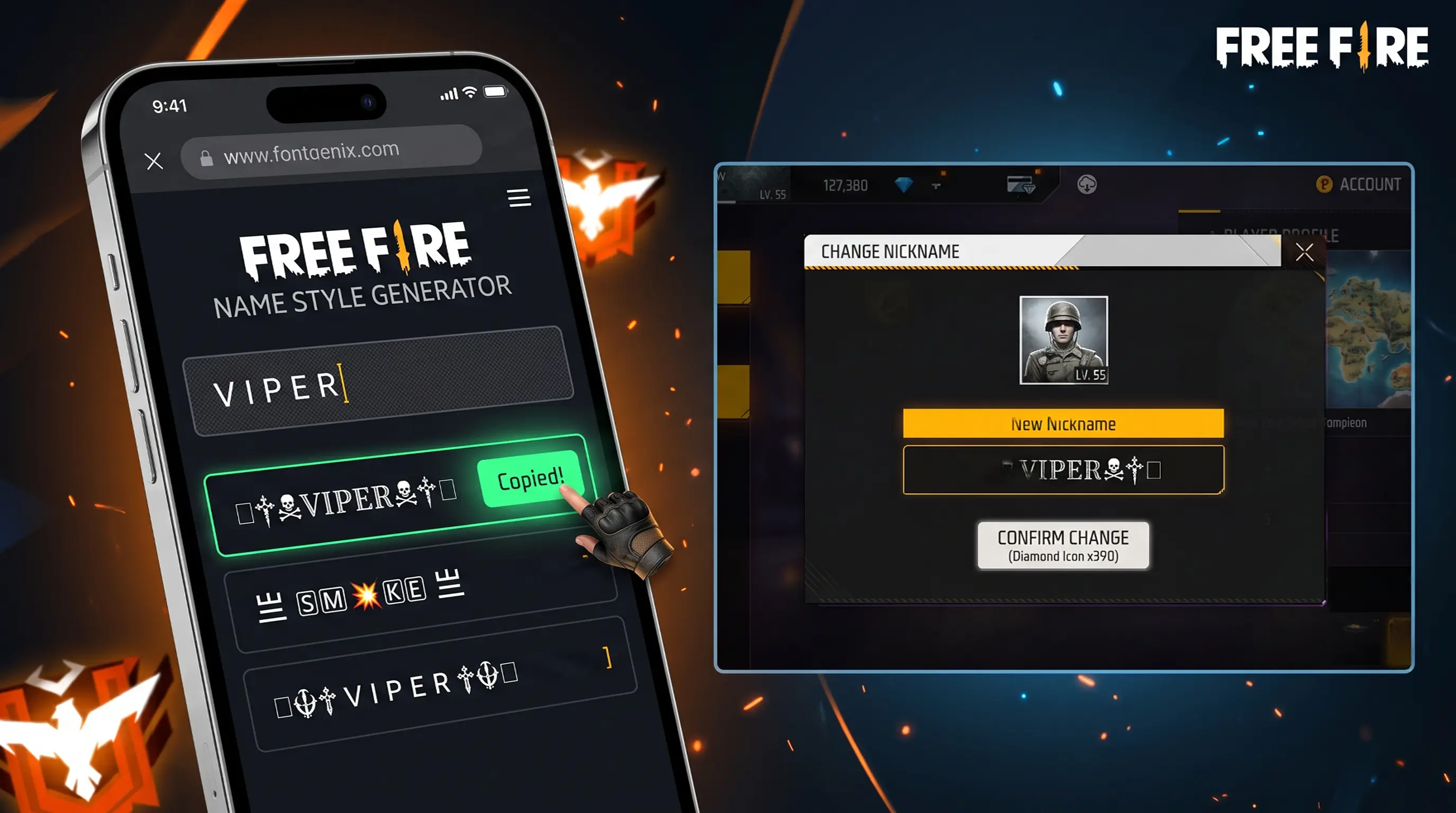
How to Change Your Nickname in Garena Free Fire
Updating your profile tag or guild identity in Free Fire is quick and straightforward. Follow these steps to apply your new styled name:
- Generate: Enter your preferred nickname in the input box at the top of this page.
- Select: Browse through the generated list and copy the style card you like best by clicking on it.
- Launch Free Fire: Open the game on your device and navigate to the top-left corner to tap your profile banner.
- Edit Info: Tap the yellow gear/edit icon next to your current name.
- Apply: Paste the copied styled nickname in the "New Nickname" text field and confirm the change using a Name Change Card or 390 diamonds.
Popular Nickname Symbols & Font Meanings
Gamers often use symbols to indicate their clan ranks, favorite roles, or personality vibes. Here is a breakdown of popular Free Fire symbols:
| Symbol / Layout | Gaming Designation | Aesthetic Vibe & Use Case |
|---|---|---|
| ツ (Katakana Shi) | The Boss / Smile Symbol | Popular symbol representing confidence and leadership. |
| ꧁༺ ༻꧂ (Wings) | Angelic Wings Border | Surrounds the nickname to give it a royal, legendary look. |
| 亗 (Crown) | King / Emperor Emblem | Placed at the beginning of names to denote high ranking or supremacy. |
| ⚡ (Lightning) | Speed / Rush Emblem | Perfect for rushers and aggressive close-range combat players. |
How to Make an Invisible Name in Free Fire
To hide your name completely or create custom spacing, Free Fire will not accept regular spacebar spaces. Instead, you need to use the Unicode character U+3164 (known as the Hangul Filler). When pasted in Free Fire, this character is treated as invisible, allowing you to bypass name blocks and space out symbols perfectly. You can easily generate and copy this invisible character using our tool.
Popular Free Fire Name Styles to Copy & Paste
Looking for quick inspiration? Here is a list of top Free Fire nicknames grouped by gaming style that you can copy, paste, and customize:
- Aggressive / Killer Names: 々C R I M I N A L々, ☠️D E S T R O Y E R☠️, 🔥D E A T H🔥, ⚔️SLAYER⚔️, 👿V E N O M👿
- Boss & King Vibe: 亗 B O S S 亗, ♛L E G E N D♛, 👑E M P E R O R👑, ⚡️THUNDER⚡️, 𓊈K I N G𓊉
- Aesthetic & Cute Styles: ✿ A N G E L ✿, 🌸S W E E T🌸, 🧸K O A L A🧸, 🕊️P E A C E🕊️, 🍒C H E R R Y🍒
- One-Tap & Sniper Styles: 🎯O N E T A P🎯, ▄︻デ┳═ーS N I P E R, ︻╦╤─HEADSHOT, 🔫G U N N E R🔫
Free Fire Guild Name Formatting Guide
A great guild name style coordinates your squad's identities in competitive ranks. Standard esports guild structures follow specific layout protocols:
- Esports Guild Bracket Prefix: Place the abbreviated guild prefix inside special bracket borders at the front (e.g.
『𝖦𝖴𝖨𝖫𝖣』𝖯 𝗅𝖺𝗒𝖾𝗋). - Symbol Dividers: Separate squad tags using vertical space lines or dot ornaments (e.g.
𝖦𝖴𝖨𝖫𝖣丨𝖯𝗅𝖺𝗒𝖾𝗋). - Symmetrical Guild Seals: Frame the guild name with matching side wings for maximum authority (e.g.
꧁༺ 𝖦𝖴𝖨𝖫𝖣 ༻꧂).
How to Get a Free Name Change Card in Free Fire
Spending 390 diamonds for every name change is expensive. Thankfully, Garena provides several ways to obtain a Name Change Card for free or at a highly discounted price. Here is how you can get one:
- Guild Store Token Exchange: If you are a member of a Guild, you can earn Guild Tokens by playing daily matches with your squad. Navigate to the
Shop > Redeem > Guild Tokentab, where you can buy a Name Change Card for just 39 Guild Tokens + 79 diamonds. - Regional Battle Event Rewards: Keep an eye on regional tournaments and battle events in the events section. Completing active challenges earns you points, which can be directly redeemed for free Name Change Cards.
- Returning Player Packages: If you take a break from the game for more than 15 days, Garena welcomes you back with a "Returnee Event". Daily check-ins and matches during this period award Rename Cards and custom items for free.
Free Fire vs. Free Fire MAX: Name Style Differences
Both standard Free Fire and Free Fire MAX share the same database, meaning a name changed in one app will automatically carry over to the other. However, due to the high-definition graphics engine used in Free Fire MAX, font weights and spacing of special character sets might render slightly crisper or larger. Always keep your name styles under 12 characters to ensure they fit correctly on both lobby banners and kill feeds across both apps.
Tips for Designing the Perfect Gaming Nickname
A great gaming tag should be memorable and look clean. Keep these tips in mind when designing your Free Fire name style:
- Legibility First: Avoid over-cluttering your nickname with too many symbols. Ensure that players and guild leaders can easily read your main name during active match summaries.
- Keep it Under 12 Characters: Free Fire restricts nickname lengths. Using custom Unicode scripts and complex borders can consume character limits quickly, so keep the base letters short.
- Match Your Combat Role: Choose symbols that represent your gameplay style (e.g., crosshairs for snipers, lightning bolts for rushers, crowns for leaders).
Explore More Typography Tools
Need a wider range of text styles, scripts, or symbols? Explore our other free typography generators:
➤ Specific Style Font Generators: Customize your text into specific style variants using our bold text generator, bubble text generator, cursive text generator, glitch text generator, small text generator, strikethrough text generator, underline text generator, upside down text generator, and zalgo text generator.
➤ Social Fonts Generators: Design custom layouts for bios, captions, and posts on Instagram, Facebook, Twitter (X), YouTube, LinkedIn, WhatsApp, and Discord.
➤ Gaming Name Styles: Create unique, styled nicknames and copy custom symbols for Free Fire and PUBG Mobile.
➤ Cute Font Generator: Decorate standard text with starry borders, bubbles, and flowers on our Cute & Pretty Font Generator.
➤ Text Symbols Copy & Paste: Copy and paste 2,000+ cool text symbols (like stars, arrows, hearts, and musical notes) from our Text Symbols library.
➤ Main Font Changer: Access over 250+ unique styles (including gothic, bold, glitch, and double-struck) on the FontGenix Homepage.