
Hindi Font Style Generator ✍️
Transform your Hindi script text into stunning calligraphy, handwriting, and designer styles. Copy styled text as images, download solid/transparent PNG previews, or download TTF files instantly.
Typing Guide: Type in Hindi (recommended) or English (may not convert perfectly for some fonts). Copy/download as PNG or TTF.
Advertisement
नमस्ते भारत
नमस्ते भारत
नमस्ते भारत
नमस्ते भारत
नमस्ते भारत
नमस्ते भारत
नमस्ते भारत
नमस्ते भारत
namastae Baarta
namastae Baarta
namastae Baarta
namastae Baarta
What is a Hindi Font Style Generator?
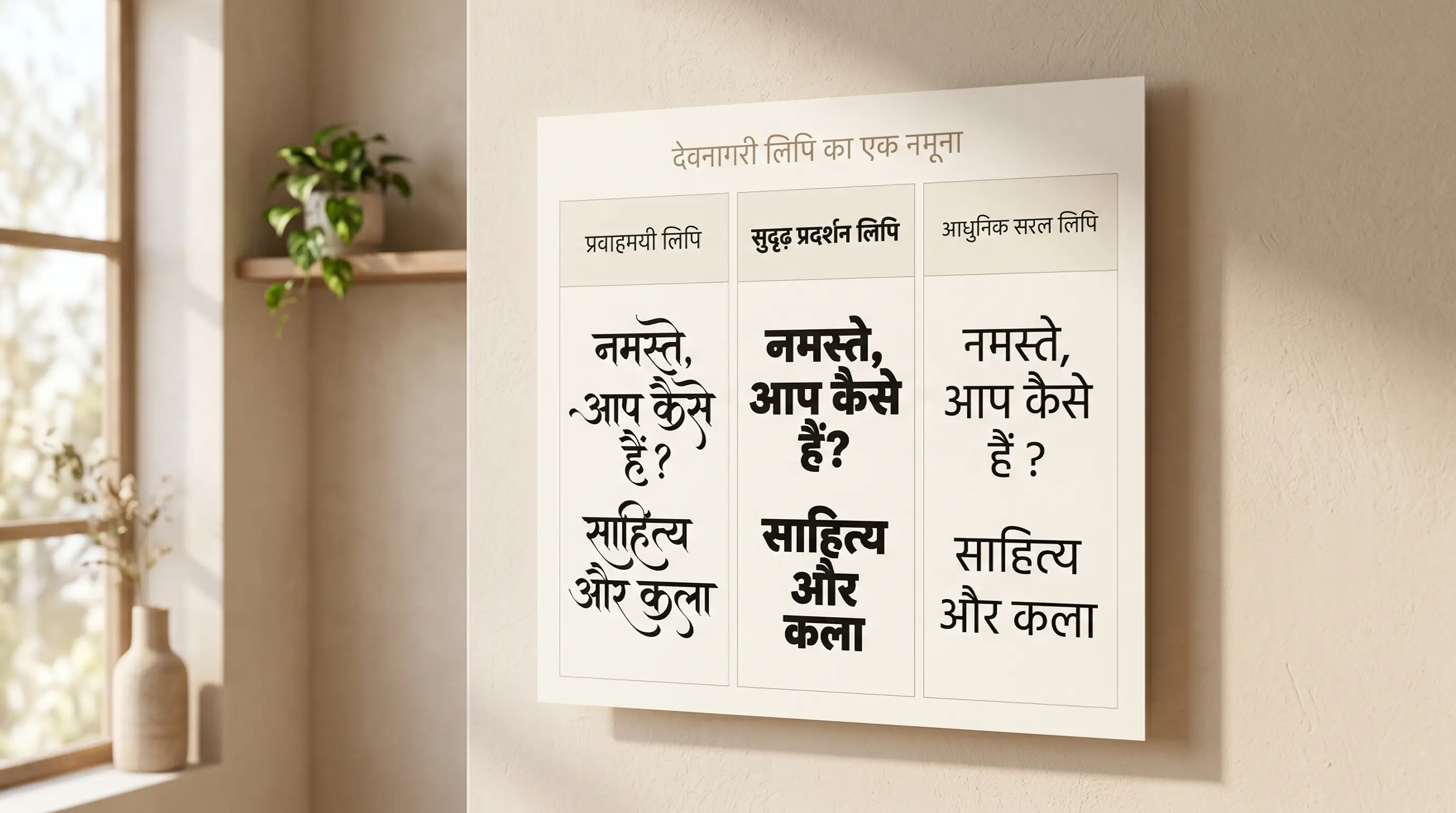
A Hindi Font Style Generator is an advanced web-based typography utility designed to help designers, bloggers, and content creators style Hindi (Devanagari) text in various artistic fonts. Unlike Latin characters, which have standard Unicode mathematical stylized forms, Devanagari typography requires loading actual font files (TTF/OTF) to render unique calligraphy or brush designs. This generator compiles 90+ premium Hindi font files into one easy-to-use playground, showing real-time previews of how your text looks in handwriting, display, and traditional calligraphy styles.
Our generator supports both modern Unicode Devanagari fonts (compatible across all modern web browsers and mobile devices) and classic legacy fonts (including the popular AMS Calligraphy, Diya, and DG series) that are widely used by DTP professionals and graphic designers in India.
The Evolution & History of Devanagari Typography
The Devanagari script, used to write Hindi, Marathi, Sanskrit, and Nepali, has a rich structural history dating back over a thousand years. It evolved from the ancient Brahmi script, transitioning through Gupta and Siddham scripts before taking its recognizable modern form around the 7th century CE. Characterized by its horizontal hanging top bar (the shirorekha) and rounded vertical stems, Devanagari is an alphasyllabary script where letters represent consonants with inherent vowel markers.
When printing technology emerged in India during the 18th and 19th centuries, early publishers faced massive hurdles. Because Devanagari contains complex conjuncts (half-letters combined together) and floating vowel modifiers (matras), it required setting up hundreds of unique metal type blocks. Metal type designers had to cast separate pieces for each ligature, making Hindi printing a tedious, labor-intensive craft compared to the relatively simple 26-letter Latin alphabet.
The shift to digital typesetting in the late 20th century introduced the Remington keyboard layout (popularized by typewriter brands). To type Hindi, software mapped Devanagari glyphs directly onto Latin keyboard keymaps, giving birth to legacy fonts such as Krutidev and Devlys. In recent decades, the establishment of the global Unicode standard has united digital languages, enabling native Devanagari characters to display instantly across computers and mobile operating systems globally without external rendering packs.
Understanding Unicode vs. Krutidev (Legacy) Font Systems
When working with Hindi typography, you will encounter two primary font architectures:
1. Modern Unicode Devanagari Fonts (Mangal, Baloo, Mukta)
Unicode is the international standard for text representation. Standard Android/iOS keyboards and Google Input Tools type Unicode by default. When you copy Unicode Hindi text, it remains standard Hindi regardless of what font is applied. It is compatible with Instagram bios, WhatsApp chat, Facebook status updates, and web pages because the text is stored as semantic Devanagari characters.
2. Legacy Remington Layout Fonts (Krutidev, Devlys, AMS Calligraphy)
Before Unicode, software typed Hindi by replacing Latin letters with Devanagari glyphs (e.g. typing "d" produced "क"). These fonts are called legacy or Krutidev-layout fonts. Most highly-decorative Hindi calligraphy and script fonts (like AMS Kesri, AMS Handwriting, and Calligraphy 1-7) are designed this way. If you copy a legacy font string, it looks like gibberish English letters (e.g. "Hkkjr" instead of "भारत"). However, in professional DTP tools like Adobe Photoshop, CorelDraw, or MS Word, pasting this code and selecting the AMS or Krutidev font instantly displays beautiful Hindi calligraphy.
How to Generate and Paste Custom Hindi Calligraphy in Photoshop
Hindi is the one Devanagari language where a designer is almost guaranteed to be juggling two incompatible text systems at once — the Unicode text a client sends over WhatsApp, and the Krutidev or AMS keystroke code that the print-shop file actually contains. The workflow below is built around that split, so you never have to guess which kind of text is sitting on your clipboard.
Step 1 — Input Hindi Text
Type or paste real Devanagari into the input box at the top of this page — भारत, not Hkkjr. Any Unicode source works: Gboard's Hindi layout, the InScript keyboard built into Windows, Google Input Tools, or text lifted straight out of a client's Word document. If what you paste already looks like scrambled Latin letters, it is Remington-layout keystroke code from a legacy file rather than Hindi, and you should re-type the words in Devanagari instead — the preview needs real characters to shape matras and conjuncts correctly.
Step 2 — Preview and Choose Style
Move through the tabs and watch what each font does to the hard parts of the word, not the easy ones. A Hindi headline lives or dies on its jodakshar (conjuncts) — क्ष, त्र, ज्ञ, द्व — and on where the reph hook and the i-matra land relative to the shirorekha. Type a test string containing at least one conjunct and one ि before you commit. Heavy AMS display faces such as AMS Kesri thicken the top bar until a stacked conjunct closes up into a blob at poster sizes; the size slider is the fastest way to catch that, because a form that reads cleanly at 40px can collapse at 120px on a banner. In the Legacy / AMS tab the preview is rendering the Krutidev-style keystroke mapping for you, so what you see is exactly what the DTP file will print.
Step 3 — Copy as Image or Download PNG
Click Copy (as image) to put a rendered raster of the shaped Hindi line straight onto your clipboard, or use PNG download / Transparent for a file. This image path exists specifically because Devanagari shaping is the first thing that breaks when text crosses an app boundary: the browser has already applied the halant/virama rules, positioned the matras, and formed the conjuncts, and baking that into pixels means no downstream app can re-shape it wrongly. For a Bollywood-style poster title, a wedding shaadi card panel, or a news-channel lower third, the transparent PNG drops onto the artwork with the ligatures already correct.
Step 4 — Use in Photoshop or Install TTF
If you want live, editable type instead of an image, download the TTF and install it — but set Photoshop up first. Go to Preferences → Type and switch the text engine to Middle Eastern & South Asian (older builds call it the World-Ready composer), then restart. Without it, Photoshop composes Devanagari left-to-right with no shaping engine: your matras detach, the ि refuses to jump in front of its consonant, and conjuncts stay as two half-letters glued by a visible halant. With it enabled, a Unicode face like Mukta or Baloo 2 shapes properly and you can type Hindi directly on the canvas. Legacy AMS and Krutidev faces are the opposite case — they do not care about the composer at all, because each key is simply mapped to a finished glyph, which is precisely why Indian DTP studios and press houses still ship Krutidev files thirty years on.
Features of the FontGenix Hindi Font Changer
➤ Massive Font Library: Preview your design across 90+ custom Hindi TTF font files instantly in one workspace.
➤ Devanagari Font size controller: Adjust the preview size in real-time to check the readability of headlines, logos, or subheadings.
➤ Favorites List: Pin the styles you love to a separate favorites list for quick access during large design sprints.
➤ No Registration Needed: 100% free tool that runs entirely client-side for rapid, private workflow without any sign-ups or ads.
Types of Hindi Fonts Available
| Font Category | Examples | Primary Use Cases |
|---|---|---|
| Unicode Display Fonts | Baloo 2, Yatra One, Eczar, Kalam | Blogging headers, website body copy, app interfaces, and social media text. |
| AMS Calligraphy Style | AMS Kesri, AMS, Calligraphy 1-7 | Banner designs, wedding invitations, festival posters, brand logos, and YouTube thumbnails. |
| Handwriting Styles | AMS Handwriting 1-4, DG Hand | Lettering designs, creative quotes, informal designs, and book covers. |
| Decorative Display Styles | Diya, Dipawali 01, Ganesha, Glassy | Special seasonal banners, devotional graphics, and high-contrast titles. |
Why Use Hindi Calligraphy Fonts in Graphic Design?
Typography is the backbone of visual storytelling. In India, Devanagari calligraphy holds deep cultural and aesthetic value. Standard fonts often lack the personality, curves, and flourish required for festive banners, wedding cards, book covers, and local brand designs. Incorporating premium AMS calligraphy styles instantly commands attention and gives design projects a premium, hand-crafted feel.
Using our Hindi font changer, you can experiment with different styles in real time before selecting the perfect look. Whether it is a bold headline for a festival flyer or a soft cursive script for a poetry post, having a diverse font list is essential for any modern graphic designer.
Tips for Installing and Using TTF Fonts on Mobile & Desktop
Installing a Hindi TTF is easy. Getting Hindi to shape after you install it is the part that trips people up, and the answer is different in every app — so treat the notes below as a compatibility map rather than a generic install guide.
How to Install Fonts on Windows & macOS
Double-click the downloaded .ttf, then click Install on Windows or Install Font in the macOS Font Book window. From there the two font families behave very differently. A Unicode Devanagari face (Mukta, Baloo 2, Kalam) will render correctly anywhere the OS shaping engine is active — Word, Illustrator, Premiere Pro's title tool — because Windows DirectWrite and macOS Core Text both know the Devanagari rules. A legacy Krutidev, Devlys or AMS face is not Hindi to the operating system at all: it is a Latin font whose glyph slots happen to contain Devanagari shapes, keyed to the Remington typewriter layout. So install it, switch your keyboard back to plain English, and type in ASCII — the Krutidev mapping turns your Latin keystrokes into Hindi on screen. Never mix the two in one text layer, and never expect a spell-checker, a search box, or Google to read a word set in Krutidev; the underlying bytes still say Hkkjr.
How to Import Fonts to PicsArt & PixelLab (Mobile)
Copy the TTF into the PicsArt/Fonts folder for PicsArt; in PixelLab open the Font panel, tap the My Fonts tab, hit the folder icon and point it at your download directory. Then check one thing before you build the whole thumbnail: type a conjunct such as क्ष or a word with an ि matra and see whether the app shapes it. Several mobile editors render Devanagari through a simple glyph-per-codepoint path with no complex-text shaping, so the pre-base ि stays stranded behind its consonant and half-letters never join. When that happens, stop fighting the app: come back to this page, set the line in the font you wanted, and use Copy (as image) or the transparent PNG. The rendering is already correct, and PixelLab or PicsArt only has to place a picture. Legacy AMS and Krutidev faces are the exception — because they carry no shaping rules at all, they usually import into mobile apps and look right immediately.
How to Upload Fonts to Canva
Canva Pro users can add a Hindi TTF under Brand → Brand Fonts → Upload a Font. Upload a Unicode Devanagari family and Canva will shape it correctly, which makes it a solid choice for Hindi social posts, festival creatives and YouTube end-cards. Uploading a Krutidev or AMS calligraphy TTF technically works too, but remember you must then paste the ASCII keystroke code — not Devanagari — into the text box, or Canva will simply fall back to a default face and your headline will show up in plain Latin letters. For one-off Hindi title art, the PNG route is almost always quicker than the Brand Kit round-trip.
Explore More Typography Tools
Need styles for other alphabets or symbols? Check out our free tools:
➤ Main Font Generator: Style English/Latin text into 360+ stylish variations on the FontGenix Homepage.
➤ English Font Style Generator: Convert English text into 360+ Google Fonts and Unicode variations on our English Font Style Generator.
➤ Arabic Font Style Generator: Convert Arabic script text into 260+ stylish calligraphy styles on our Arabic Font Style Generator.
➤ Sinhala Font Style Generator: Convert Sinhala script text into 110+ stylish calligraphy styles on our Sinhala Font Style Generator.
➤ Japanese Font Style Generator: Convert Japanese script text into 68+ stylish fonts on our Japanese Font Style Generator.
➤ Marathi Font Style Generator: Convert Marathi Devanagari text into 140+ stylish fonts on our Marathi Font Style Generator.
➤ Odia Font Style Generator: Convert Odia script text into 57+ premium calligraphy styles on our Odia Font Style Generator.
➤ Punjabi Font Style Generator: Convert Punjabi script text into 114+ stylish calligraphy styles on our Punjabi Font Style Generator.
➤ Telugu Font Style Generator: Convert Telugu script text into 70+ premium calligraphy styles on our Telugu Font Style Generator.
➤ Tamil Font Style Generator: Convert Tamil script text into 77+ stylish calligraphy styles on our Tamil Font Style Generator.
➤ Malayalam Font Style Generator: Convert Malayalam script text into 204+ stylish calligraphy styles on our Malayalam Font Style Generator.
➤ Kannada Font Style Generator: Convert Kannada script text into 85+ premium calligraphy styles on our Kannada Font Style Generator.
➤ Bengali Font Style Generator: Convert Bengali script text into 88+ stylish calligraphy styles on our Bengali Font Style Generator.
➤ Gujarati Font Style Generator: Convert Gujarati script text into 48+ stylish calligraphy styles on our Gujarati Font Style Generator.
➤ Nepali Font Style Generator: Convert Nepali script text into 180+ stylish calligraphy styles on our Nepali Font Style Generator.
➤ Cute Font Generator: Decorate standard text with starry borders, bubbles, and flowers on our Cute & Pretty Font Generator.
➤ Fancy Numbers Generator: Convert digits into circled, boxed, or Roman numerals on the Fancy Numbers Font Generator.
Frequently Asked Questions
The Hindi Font Style Generator is an online utility that enables you to style Devanagari text in 90+ custom Hindi fonts (including AMS Calligraphy, traditional script, handwriting, and modern Google fonts). You can type in Hindi, preview the output instantly, copy it as an image, or download solid/transparent PNGs and TTF files.
You can copy the styled text as a high-quality PNG image to your clipboard by clicking the 'Copy (as image)' button, or download it as a PNG file with a solid white or transparent background using the 'PNG download' and 'Transparent' buttons.
You can download the raw TTF font files directly by clicking the 'TTF download' button next to any font style. This allows you to install the font family locally on your operating system and use it in tools like Photoshop, CorelDraw, Illustrator, or MS Word.
Yes! Standard Unicode fonts work natively, but legacy calligraphy fonts require font files installed on the viewer's device. To share styled calligraphy text on social media like Instagram, WhatsApp, or TikTok, click the 'Copy (as image)' button and paste it directly as a graphic preview in your stories, chat feeds, or posts.
You can write Devanagari text using standard keyboards on your phone or PC. Alternatively, you can use Google Input Tools (Hindi Transliteration) to type phonetically in English (e.g. typing "namaste") and have it automatically converted into Devanagari ("नमस्ते") in real-time before pasting it into our input box.
Yes, all Hindi and AMS calligraphy fonts on FontGenix are 100% free to download and use for personal or educational projects. For commercial usage, please refer to the specific licensing terms of individual font authors.
Yes! Once you download the TTF files from our generator, you can install them on your system to use in professional design software like Adobe Photoshop, CorelDraw, and Illustrator, or import them directly into video editing apps like Kinemaster and graphic design tools like Canva.